 Vouch
VouchSwift Package Manager
Under Development: This SDK is currently in development. Documentation and API may change. For production use, please contact our team.
Requirements
Before installing the Vouch iOS SDK, ensure your development environment meets the following requirements:
- Xcode: 16.4 or later
- iOS Deployment Target: iOS 14.0 or later
- Minimal iOS version to perform a verification: iOS 16.4 or later
Installation
The Vouch iOS SDK can be integrated using Swift Package Manager through either Xcode's graphical interface or by editing your Package.swift file directly.
Method 1: Xcode Interface
-
Open your project in Xcode and navigate to your project settings.
-
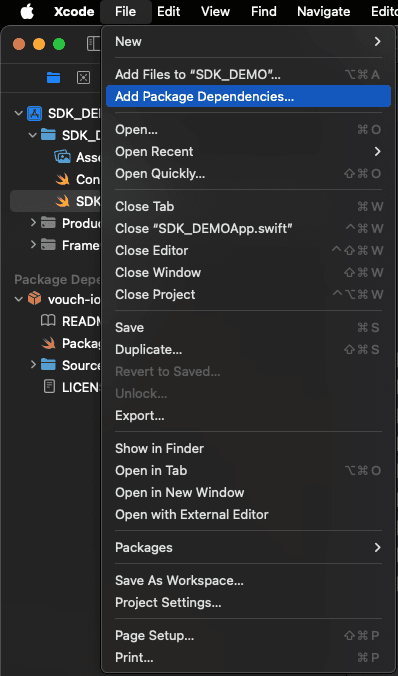
Add the package dependency:
- Select
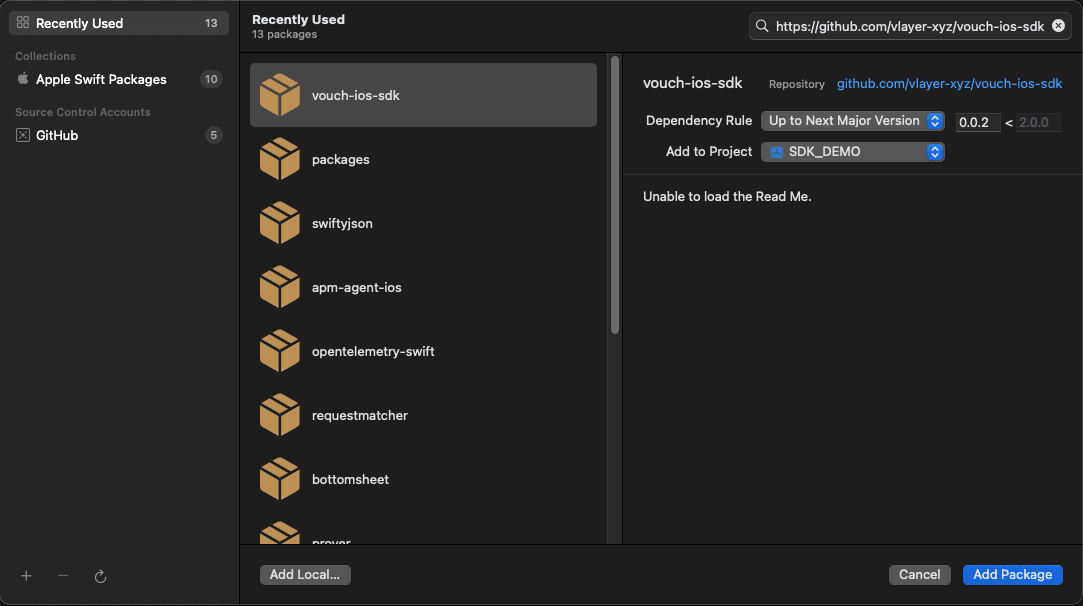
File→Add Packages...from the menu bar - In the search field, enter the repository URL:
https://github.com/vlayer-xyz/vouch-ios-sdk - Xcode will automatically detect the package
- Select
-
Configure the dependency rule:
- Select your preferred versioning strategy. We recommend
Up to Next Major Versionfor the most stable experience - Click
Add Package
- Select your preferred versioning strategy. We recommend
-
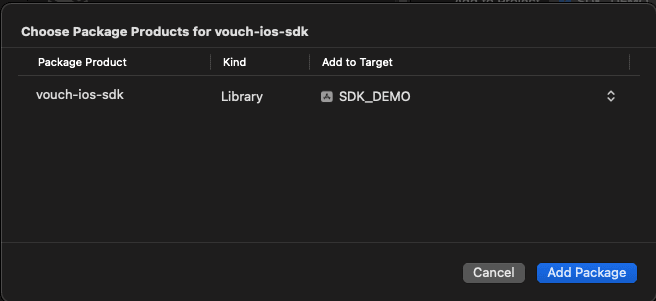
Select your target:
- Ensure both
vouch-ios-sdkand your application target are selected - Click
Add Packageto complete the installation
- Ensure both
Method 2: Package.swift
If you're managing dependencies through a Package.swift file, add the Vouch iOS SDK as follows:
Add the package dependency:
dependencies: [
    .package(
        url: "https://github.com/vlayer-xyz/vouch-ios-sdk",
        .upToNextMajor(from: "0.0.2")
    ),
    // Your other dependencies...
]
Add the product to your target:
.target(
    name: "YourTarget",
    dependencies: [
        .product(name: "vouch-ios-sdk", package: "vouch-ios-sdk"),
        // Your other dependencies...
    ]
)
Verification
After installation, verify the SDK is properly integrated by importing it in your Swift files:
import VouchSDKIf the import succeeds without errors, the SDK has been installed correctly. You can now proceed to the Usage Guide (Swift) or Usage Guide (Objective-C) to learn how to integrate verification flows into your application.