 Vouch
VouchVerifying Vouch webhooks
When using Vouch to generate web proofs, your application receives webhook requests containing the verification result and extracted data. Vouch verifies each proof cryptographically before sending the webhook. Your webhook handler must verify that the request originated from Vouch and must validate and process all outputs in your application flow.
This guide describes the required steps (webhook authentication and output validation) and, optionally, how to cryptographically verify the presentation when needed for auditability or third-party verification.
When you receive a webhook:
- Verify the request. Check the
Authorizationheader matches your webhook secret (PSK <your-webhook-secret>). Reject the request if it does not. - Validate and process outputs. Ensure outputs are present, correctly shaped, and meaningful for your use case; then use them in your business logic (e.g. update records, drive decisions).
- (Optional) Verify the presentation. If you need auditability or a third party must verify the proof, call the verification endpoint with
presentationJsonfrom the payload.
Webhook Response Structure
When a user completes verification through Vouch, a webhook is sent to your configured webhookUrl containing:
requestId: Unique identifier for the verification requestdataSourceId: Identifier for the data source usedmetadata: The optional free-form string you attached when creating the proof request (omitted when not set)outputs: Aggregated extracted data from all web verificationswebProofs: Array of web verification objects, each containing:outputs: Data extracted from this specific verificationpresentationJson: The presentation object (for optional verification)decodedTranscript: Human-readable HTTP request/response data
A single verification request can produce multiple web proofs.
You'll still receive one webhook payload, but webProofs will contain multiple entries,
and top-level outputs is the aggregated data across all verifications.
Example webhook response:
{
  "requestId": "00000000-0000-0000-0000-000000000000",
  "dataSourceId": "11111111-1111-1111-1111-111111111111",
  "metadata": "internal_user_id:12345",
  "outputs": {
    "twitterLinked": true,
    "portfolioValueUsd": "6.97",
    "accountAgeDays": 360,
    "portfolioChange24h": "-0.29"
  },
  "webProofs": [
    {
      "outputs": {
        "twitterLinked": true,
        "accountAgeDays": 360
      },
      "presentationJson": { "...": "..." },
      "decodedTranscript": { "...": "..." }
    },
    {
      "outputs": {
        "portfolioValueUsd": "6.97",
        "portfolioChange24h": "-0.29"
      },
      "presentationJson": { "...": "..." },
      "decodedTranscript": { "...": "..." }
    }
  ]
}
To receive webhook responses, configure a webhookUrl when initiating the verification flow. See the Getting Started guide or Integration Example for details on setting up webhooks.
Webhook Allowlist
If you allowlist inbound webhook traffic, add our static IPs:
52.59.138.513.78.83.192
Testing webhooks
You can trigger a test webhook directly from the Vouch dashboard. Next to any data source item, click Try it now → Test webhook to send a sample webhook payload to your configured webhookUrl.
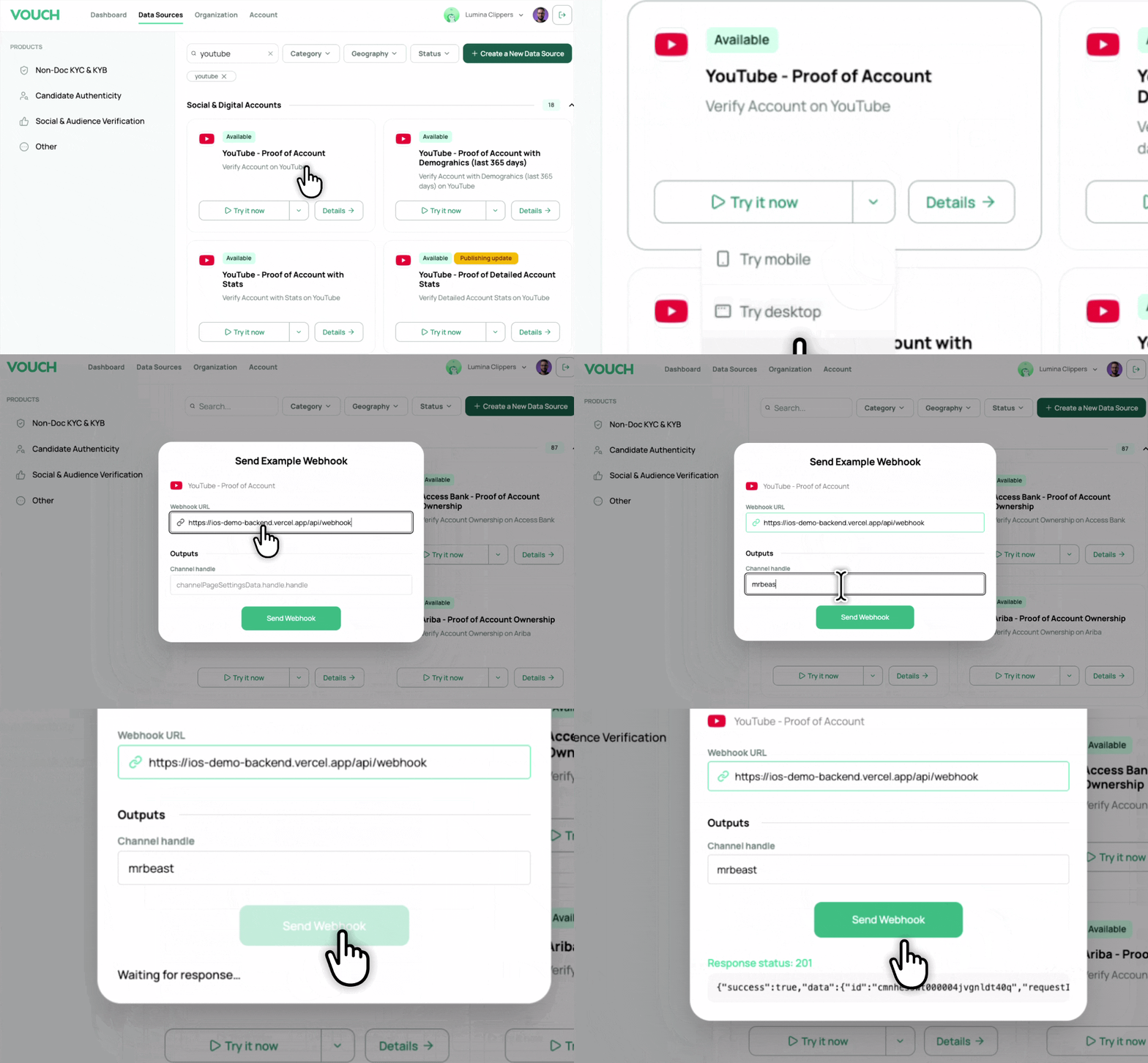
This lets you verify your webhook handler works correctly before running a real verification.
Required: Verifying webhook requests
Before processing a webhook payload, verify that the request came from Vouch. Vouch authenticates each webhook request using a webhook secret (pre-shared key) assigned to your account.
How the secret is sent
Vouch sends the webhook secret in the Authorization header:
Authorization: PSK <your-webhook-secret>The webhook secret is a base64-encoded value. You can view and regenerate it in the Vouch dashboard under Organization → Webhook Secret.
What to do in your handler
- Read the
Authorizationheader from the incoming request. - Compare it to your stored webhook secret. The value must match
PSK <your-webhook-secret>exactly. - Reject the request (e.g. with 401 Unauthorized) if the header is missing or does not match. Do not parse the body or trigger any business logic until the request is authenticated.
Example (Node.js):
function verifyWebhookOrigin(request, expectedSecret) {
  const auth = request.headers.get("Authorization");
  const expected = `PSK ${expectedSecret}`;
  if (!auth || auth !== expected) {
    throw new Error("Invalid or missing webhook authorization");
  }
}
Required: Validating and processing outputs
After authenticating the webhook, validate and process all outputs in your application. Do not merely forward or store the payload: your system must treat the outputs as first-class data in your workflows.
- Validate presence and shape: Ensure all outputs you rely on are present and match the types and structure you expect (e.g. required fields, correct value types).
- Validate meaning: Confirm that values are meaningful for your use case. For example, if the data source provides citizenship, verify that the citizenship value is one you accept and that it aligns with your business rules.
- Process in your flow: Use the outputs in your business logic. For example, to update user records, drive eligibility decisions, or pass data to downstream systems. Your application must process outputs in its own flows rather than only persisting or forwarding them.
Reject or flag webhooks whose outputs are missing, malformed, or inconsistent with your requirements, and do not rely on such data for decisions.
Optional: Cryptographic verification of the presentation
For auditability or when a third party must cryptographically verify the proof (for example for compliance or when another system needs to verify the evidence), you can verify the presentation using the POST /api/v1/verify endpoint. This step is not required to trust that the webhook came from Vouch (use the webhook secret for that) or to use the outputs in your own flow (use validation and processing above).
Step 1: Extract the presentation from webhook response
The presentationJson field contains the cryptographic verification:
// Example webhook payload received at your endpoint
const webhookPayload = {
  requestId: "00000000-0000-0000-0000-000000000000",
  outputs: {
    // ...
  },
  webProofs: [
    {
      outputs: { /* ... */ },
      decodedTranscript: { /* ... */ },
      presentationJson: {
        data: "014000000000000000db...",
        meta: {
          notaryUrl: "https://notary.example.com/v0.1.0-alpha.12",
          websocketProxyUrl: "wss://proxy.example.com"
        },
        version: "0.1.0-alpha.12"
      }
    }
  ]
};

// Extract first verification — repeat for each entry in webProofs when verifying all
const presentation = webhookPayload.webProofs?.[0]?.presentationJson;
if (!presentation) throw new Error("No webProofs or presentationJson found");
# Example webhook payload received at your endpoint
WEBHOOK_PAYLOAD='{
"requestId": "00000000-0000-0000-0000-000000000000",
"dataSourceId": "11111111-1111-1111-1111-111111111111",
"outputs": {
// ...
},
"webProofs": [
{
"outputs": { "..." },
"decodedTranscript": { "..." },
"presentationJson": {
"data": "014000000000000000db...",
"meta": {
"notaryUrl": "https://notary.example.com/v0.1.0-alpha.12",
"websocketProxyUrl": "wss://proxy.example.com"
},
"version": "0.1.0-alpha.12"
}
}
]
}'
# Extract first verification — repeat for each entry in webProofs when verifying all
PRESENTATION=$(echo "$WEBHOOK_PAYLOAD" | jq '.webProofs[0].presentationJson')Step 2: Verify the presentation
Send the extracted presentation to the verification endpoint:
const verifyResponse = await fetch('https://web-prover.vlayer.xyz/api/v1/verify', {
  method: 'POST',
  headers: {
    'Content-Type': 'application/json',
    'x-client-id': '4f028e97-b7c7-4a81-ade2-6b1a2917380c',
    'Authorization': 'Bearer jUWXi1pVUoTHgc7MOgh5X0zMR12MHtAhtjVgMc2DM3B3Uc8WEGQAEix83VwZ'
  },
  body: JSON.stringify(presentation)
});

const verificationResult = await verifyResponse.json();
console.log(JSON.stringify(verificationResult, null, 2));
curl -s -X POST https://web-prover.vlayer.xyz/api/v1/verify \
-H "Content-Type: application/json" \
-H "x-client-id: 4f028e97-b7c7-4a81-ade2-6b1a2917380c" \
-H "Authorization: Bearer jUWXi1pVUoTHgc7MOgh5X0zMR12MHtAhtjVgMc2DM3B3Uc8WEGQAEix83VwZ" \
-d "$PRESENTATION" | jq '.'The included credentials are for limited public use. For production use, please contact our team.
Expected Result
You should receive a JSON response with "success": true and the decoded request/response data (see below). Any other result should be treated as an invalid verification and must halt further processing or workflows.
{
  "success": true,
  "serverDomain": "example.com",
  "notaryKeyFingerprint": "0000000000000000000000000000000000000000000000000000000000000000",
  "request": {
    "method": "POST",
    "url": "/api/v2/order/details",
    "version": "HTTP/1.1",
    "headers": [
      ["content-type", "application/json"],
      ["accept", "*/*"],
      ["host", "XXXXXXXXXXXXXXX"],
      ["connection", "XXXXX"]
    ],
    "body": "{\"orderNumber\":\"00000000000000000000\",\"createTime\":0}",
    "raw": "504f5354202f626170692f...",
    "parsingSuccess": true
  },
  "response": {
    "status": 200,
    "version": "HTTP/1.1",
    "headers": [
      ["content-type", "application/json"],
      ["content-length", "2543"],
      ["content-encoding", "gzip"],
      ["date", "Mon, 01 Jan 2024 00:00:00 GMT"]
    ],
    "body": "{\"code\":\"000000\",\"message\":null,\"data\":{\"orderNumber\":\"00000000000000000000\",\"asset\":\"USDT\",\"amount\":\"0.00000000\",...}}",
    "raw": "485454502f312e3120323030204f4b...",
    "parsingSuccess": true
  }
}
Sensitive header values are redacted with X characters in the response for
privacy.